


Capitol Leadership: Alliance Benefits & Presidency
Capitol Leadership and Benefits
The Capitol event ignites fierce rivalry among alliances vying for supremacy. Victory grants the winning alliance the exclusive privilege to select a president from within their ranks, marking a pivotal moment in the competition.
Once an alliance claims victory, the appointed president takes charge at the Capitol offices, overseeing key officials including the vice president—formerly known as the first lady—and a range of specialized ministries, also called hats within the game.
These ministries are strategic tools that provide essential buffs and enhancements, significantly accelerating player progress. By assigning ministries to specific players, alliances unlock various advantages such as increased speed in construction, research, healing, and training, along with capacity improvements and attribute boosts.
The presidential office becomes the central hub for leadership and management. After the president assumes office, they appoint the vice president and subsequently assign ministries. These roles are filled under strict rules:
- Only commanders with a minimum HQ level of 16 are eligible to apply.
- Each commander can hold only one position at a time.
- Applications must be submitted with caution, respecting a 30-minute cooldown between each.
- A maximum of 50 applications can be queued per position; once filled, no further applications are accepted.
- Applications expire after 24 hours, requiring re-application if not approved.
- To join the auto-appointment list, applicants need approval from the president or vice president. This list also caps at 50 commanders.
- Applicants on the auto-appointment list are assigned roles based on their queue position and timing, earning unique attribute bonuses.
- The president and vice president can directly appoint officers via the office menu or by clicking on the commander’s base on the world map.
- When a new Capitol conquest begins, all pending applications are reset, and the application process resumes only after a new president is installed.
- Official appointments are made at intervals of approximately 4 minutes and 40 seconds (~5 minutes in-game).
During wartime, if the alliance wins a Warzone duel as the attacker, the president gains a conqueror bonus, which lasts about 7 days. During this period, the president and vice president can appoint two additional roles: military commander and administrative commander, with existing position attributes receiving significant enhancements. These buffs are visualized in the officer attribute panel.
Ministries offer various benefits, including:
- Speed boosts for construction, research, healing, and training operations. However, ongoing activities are unaffected once initiated; the buffs only influence the start time, reducing the operation duration by a certain percentage.
- Capacity enhancements, such as increased hospital capacity for wounded soldiers.
- Resource production boosts: requesting hats when resource buildings are full allows collection of larger resource amounts.
- Attribute enhancements: the president receives boosts to hero HP, attack, and defense—these are automatically active upon appointment.
For example, assigning the Secretary of Development can reduce construction times through speed boosts, enabling faster building completion and more efficient resource management.
Understanding the process prior to receiving a developer hat assignment is crucial for effective project contribution.
Initially, team members should familiarize themselves with the project's goals and current status, ensuring alignment with overall objectives.
Engaging in comprehensive onboarding sessions helps clarify roles and responsibilities, laying the groundwork for successful task execution.
It is also important to review existing documentation and codebases to gain insight into the project's structure and standards.
Open communication channels with team leads facilitate the clarification of expectations and the identification of suitable tasks.
By establishing a solid foundation before the assignment, developers can contribute more efficiently and with greater confidence.
Understanding the Impact of Ministry Assignments and Boosts
When you receive a new role or "hat" in your development process that promises to enhance your construction efficiency, it's tempting to assume it will cut your building time in half. However, the actual outcome is more nuanced.
Imagine you're constructing a headquarters that requires 100 blocks.
Your baseline speed is 1 block per minute.
Without any boosts, this means it will take 100 minutes to complete the build.
Now, suppose you equip a hat that increases your construction speed by 50%.
Your new speed becomes 1.5 blocks per minute.
Applying the formula:
Time to build = Total blocks / Speed = 100 / 1.5 ≈ 66.7 minutes.
This results in approximately a 33% reduction in construction time, not 50%.
The key takeaway is that increasing your speed by a certain percentage doesn't translate directly into an equivalent percentage reduction in build time.
Furthermore, existing buffs—such as those from skins, decorations, or village bonuses—reduce the effectiveness of new speed boosts.
For example, if you already have a 100% speed increase (doubling your speed to 2 blocks per minute),
adding a 50% boost (which is calculated based on the original 1 block per minute speed) results in a new speed of 2.5 blocks per minute,
but the overall time saved drops to about 20%.
Managing your construction and official roles involves navigating through the Capitol interface.
Click on the Capitol building, then select the “Manage” button to access the management page.
From there, clicking on “Title Assignment” brings up the officials screen where current appointees—such as the president, vice president, and ministries—are displayed.
In this section, you'll also see special bonuses, like the conqueror bonus, which temporarily grants additional ministries for a week, providing strategic advantages during active periods.
Discover the exclusive officials page featuring the conqueror bonus, designed to recognize top performers and dedicated members. This section highlights key achievements, offers special rewards, and provides insights into how individuals can earn additional benefits. By visiting this page, users can stay informed about the latest updates, track their progress, and find tips to maximize their rewards. Unlock your potential and take advantage of the conqueror bonus to elevate your experience and recognition within the community.
The governance structure within the Capitol comprises various key roles, each with distinct responsibilities and benefits. These include the President, Vice President (also known as VP, formerly referred to as First Lady), Secretary of Development, Secretary of Science, Secretary of Interior, Secretary of Security, Secretary of Strategy, Military Commander, and Administrative Commander.
The position of President is exclusively held by the alliance that successfully captures the capital city. The President holds the authority to designate the Vice President and appoint individuals to the various secretarial roles, shaping the strategic direction of the alliance.
For standard officials occupying these positions, specific enhancements are granted to bolster their effectiveness. Upon appointment, the following attribute boosts are automatically activated for the President:
- Hero Hit Points (HP): increased by 5%
- Hero Attack Power: increased by 5%
- Hero Defense: increased by 5%
Officials with the conqueror bonus—those who have achieved this status—receive additional enhancements, further amplifying their combat and strategic capabilities.
Military and Strategy Boosts
When a leader is appointed as the president, certain enhancements are automatically activated to strengthen your forces. These include a 5% increase in hero health points (HP), boosting their survivability on the battlefield.
Additionally, hero attack power is enhanced by 5%, allowing your heroes to deal more damage to enemies.
Hero defense is also improved by 5%, providing better protection against incoming attacks.
Furthermore, the casualty rate of enemy units is increased by 5%, resulting in higher losses for opponents during battles.
These beneficial effects are applied instantly upon the president's appointment, giving your army an immediate strategic advantage.
The head of state designates the vice president, commonly known as VP. This individual holds the authority to select their successor and manage all other departmental appointments. However, the VP does not have the power to appoint the president.
Speed enhancements for construction, research, and training are only activated when you manually initiate these activities. Once started, you'll notice the estimated completion times decrease immediately, reflecting the boost.
Please note that ongoing projects—whether construction, research, or training—are unaffected by these speed boosts and will continue at their current pace until completion.
Standard officials, including the vice president, benefit from the following enhancements:
- Construction speed increase: 20%
- Research speed increase: 20%
- Training speed increase: 10%
After assigning the VP, proceed with your construction, research, or training tasks to maximize the efficiency gains from these improvements.
Assigning the conqueror bonus to the vice president significantly enhances operational efficiency across various domains.
Construction projects benefit from a 25% increase in speed, enabling quicker development and expansion.
Research activities also see a 25% acceleration, allowing for faster technological advancements.
Additionally, training sessions are expedited by 12.5%, improving overall workforce readiness.
Once the vice president's position is designated, it is advisable to initiate construction, research, and training tasks promptly to maximize these time-saving advantages.
Initiating a new operation triggers immediate improvements in construction and research efficiency, with completion times visibly reduced compared to previous estimates once the ministry is secured.
It's important to note that ongoing projects are not impacted by this enhancement and will continue at their existing pace.
For standard officials, such as the Secretary of Development, the benefits are as follows:
- Construction speed increases by 50%
- Research speed increases by 25%
After assigning the official to their role, begin new construction or research activities promptly to maximize the advantages of these time reductions.
Achieving the conqueror bonus for the Secretary of Development brings notable advantages to your progress.
Enhanced construction efficiency accelerates building projects by 60%, allowing you to expand rapidly.
Simultaneously, research activities are expedited by 30%, enabling quicker unlocking of new technologies.
Once you assign this role to the Secretary, immediately initiate construction and research tasks to maximize the time savings and gain a strategic edge.
The acceleration benefits for construction and research are only activated once you commence the activity. After obtaining the ministry, you'll notice the expected durations decrease compared to before.
Activities already underway will not experience any impact from this enhancement.
For standard officials, such as the Secretary of Science:
- Research efficiency increases by 50%
- Construction times are reduced by 25%
After assigning the position, begin your construction or research projects promptly to maximize the time savings provided by these boosts.
Assigning the conqueror bonus to the Secretary of Science significantly accelerates key activities.
Research progress increases by 60%, enabling faster technological advancements.
Construction projects benefit from a 30% reduction in build time, speeding up infrastructure development.
Once the role is allocated, promptly initiate research and construction tasks to maximize the efficiency gains.
To maximize the benefits of the Secretary of Interior role, follow these steps:
First, ensure your food, iron, and coin production facilities are operating at full capacity.
Once your resources are maximized, assign the Secretary of Interior to the position.
When the secretary is appointed, promptly collect your accumulated food, iron, and coins from your mines and fields.
The moment you gather these resources with the secretary in place, the respective boosts—doubling food, iron, and coin output—are automatically activated, significantly enhancing your resource generation.
Maximize resource gains by utilizing the conqueror bonus from the Secretary of Interior. This special boost enhances your resource production as follows:
- Food output increases by 150%
- Iron output increases by 150%
- Coin production increases by 150%
To fully benefit from these enhancements, ensure your resource-producing facilities—such as your food farms, iron mines, and coin mints—are at maximum capacity before collecting.
Once your facilities are full, assign the Secretary of Interior to activate the bonus. Immediately collect your resources after the assignment, and the boost will be applied, significantly accelerating your resource accumulation.
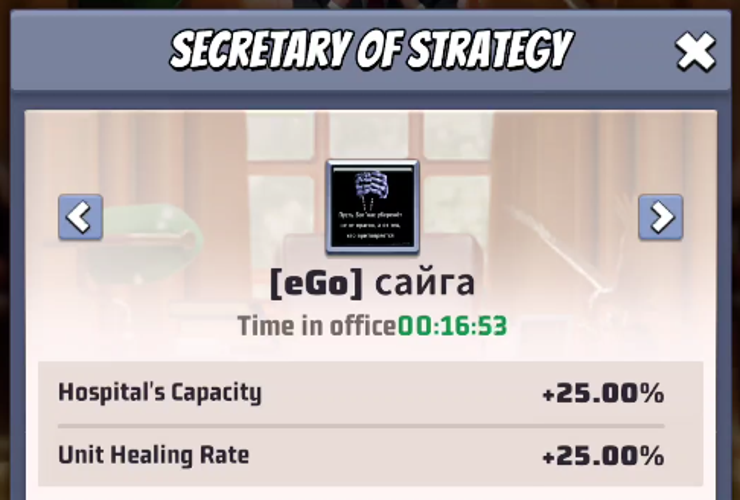
Enhancements for standard officials include an increase in hospital capacity by 20%, allowing more patients to be treated simultaneously. Additionally, the efficiency of healing units is improved by 20%, leading to faster recovery times and better overall health management within the facility.
Game Enhancements Overview
Enhancements for Conqueror Bonus Holders – Strategy Department
- Hospital Capacity Increase: 25% boost
- Unit Healing Efficiency: Improved by 25%
Boosts designed to accelerate training are only activated when you start the process. Once you acquire the ministry, you'll notice the training duration has decreased compared to before.
It's important to note that ongoing training sessions are not influenced by this enhancement.
For standard officials serving as security secretaries:
- Training capacity for units increases by 20%.
- Overall training speed also improves by 20%.
Enhancements for security personnel with conqueror bonuses include a 25% increase in unit training capacity, enabling more units to be trained simultaneously. Additionally, training speed is accelerated by 25%, allowing personnel to be prepared more efficiently.
During the period of the conqueror bonus, a special role becomes accessible, known as the military commander.
This role grants specific enhancements, including a 5% increase in march speed to facilitate faster troop movements.
Additionally, it boosts the enemy units' casualty rate by 5%, making engagements more effective.
When you assign this position, a notification will appear indicating that the conqueror status will expire in a certain amount of time, displaying a countdown timer to inform you of the remaining duration.
During the duration of the conqueror bonus, a special role becomes accessible, known as the administrative commander.
Individuals holding this position enjoy significant enhancements, including a 60% increase in construction efficiency and research progress.
When this role is assigned, players will receive a notification indicating that the conqueror status is active, accompanied by a countdown timer displaying the remaining duration of the bonus.
Currently, the process for obtaining titles or ministry roles in the game has undergone changes and the previous guidelines are outdated. Future updates will clarify the new procedures.
Historically, players interacted with the First Lady through the Capitol to request ministerial positions or hats. This involved navigating to the Capitol building, selecting the “Management” section, and identifying the current First Lady.
To initiate a request, players would send a private message via the chat system, specifying the desired position or function, such as “Minister of Science.” Along with the message, players needed to share their current in-game coordinates with the First Lady.
Once a request was made, players would visit their base, enter map mode, select their base, and use the share feature to notify the First Lady of their location. The First Lady would then provide an estimated wait time based on current queue lengths and, after some time, assign the role.
The assignment was confirmed through multiple indicators:
- A message from the First Lady confirming the receipt of the role,
- A symbol representing the assigned hat or role appearing above the base in map mode,
- Next to the player's username in chat messages,
- An announcement banner at the top of the map interface notifying about the appointment,
- An email sent to the player detailing the role information.
Additionally, a developer symbol might be visible above the base or next to the chat username, indicating administrative or special roles.
Understanding the Significance of Capitol Titles, Hats, and Ministry Assignments
Navigating the hierarchy within the Capitol requires familiarity with various titles, hats, and ministry roles assigned to individuals. These designations not only indicate authority levels but also define responsibilities and areas of influence.
Requests for Assignments and Boosts
To enhance one's position or to obtain specific assignments, individuals often need to formally request these through designated channels. Proper procedures ensure clarity and fairness in the process.
How to Submit a Request
Begin by preparing a detailed application outlining your current role, the desired assignment or boost, and the reasons supporting your request. Submit this documentation to the appropriate department or authority responsible for personnel management.
Key Considerations
When requesting a title change or ministry assignment, consider the following:
- Alignment with your skills and experience
- The strategic needs of the Capitol
- Proper acknowledgment of protocol and hierarchy
Follow-up Procedures
After submitting your request, monitor for feedback or additional information needed. Be prepared to discuss your aspirations and demonstrate your readiness for increased responsibilities.
Conclusion
Understanding the structure of titles, hats, and ministry roles, along with the correct process for requesting boosts or assignments, is essential for effective navigation within the Capitol. Clear communication and adherence to procedures facilitate career growth and organizational harmony.
Discover how to activate the map view to enhance your navigation experience.
Access the map mode through the main menu or quick access toolbar for seamless switching.
Once enabled, the map provides a detailed overview of your current location and surrounding areas.
Use zoom and pan features to explore different regions or focus on specific points of interest.
Switching between map modes is straightforward, allowing you to customize your view based on your needs.
Stay updated with real-time data and directions by keeping the map mode activated during your journey.
Please note that the following information is outdated and will be revised shortly.
In the current system, the First Lady role involves strategic management of ministry boosts to maximize team benefits. However, a key responsibility is delegating ministries to other players, enabling them to utilize the provided buffs effectively.
Typically, these assignments are managed on a rolling basis, with each player receiving a 10-minute window to benefit from their assigned ministry.
Assigning a new title or role to a player is straightforward:
- First, ask the player to specify which ministry they wish to access.
- Then, request the player to share the location of their base on the map.
- Using this information, the First Lady locates the player's base on the map interface and selects it to complete the assignment.
The First Lady selects the designated title and verifies the choice, ensuring all details are accurate before proceeding.
When assigning a ministry to a player, keep in mind that if the ministry has already been allocated to someone else, reassigning it can be tricky. To do so effectively, you need to click directly on the blue icon representing the ministry itself, rather than on the player's avatar or name.
If, during the process, the game automatically opens the current player’s profile when you attempt to assign the title, simply close that profile window. Then, carefully click on the border of the ministry's icon to proceed with the assignment.
It’s also important to note that reassignments are restricted within a short time frame. If you try to reassign the same ministry within 10 minutes of the last assignment, the game will display a message indicating that the action isn’t permitted yet.
For a visual guide, refer to the following video demonstrating how to assign the Secretary of Development to a new player.
What are Last war: Survival and Last War: Survival Hot Package?
Last War: Survival Hot Package is the essential premium currency used to acquire exclusive in-game items, unlock special hero skins, and expedite base fortification efforts in the zombie apocalypse. Players frequently top up their accounts by purchasing these packages on popular trading platforms such as Codashop, SEAGM, and Midasbuy for enhanced progression. Utilizing the Last War: Survival Hot Package allows survivors to secure rare resources and powerful gear, giving them a crucial advantage against the undead hordes. This currency is key to advancing through challenging missions and strengthening your faction's resilience in the devastated world.
Why Choose LootBar.gg to top up Last War: Survival?
If players are seeking a reliable and efficient way to top up Last War: Survival Hot Package, they may want to consider the lootbar game trading platform. As one of the most trusted names in game currency trading, lootbar.gg ensures that every transaction is secure and streamlined, providing a seamless experience for users who want to enhance their gameplay without any hassle.
One of the main advantages of using lootbar is its competitive pricing and frequent discounts. Players can enjoy up to 25% off on their Last War: Survival Hot Package purchases, making it a cost-effective solution for accessing in-game currency. Additionally, lootbar supports a variety of payment methods and offers 24/7 customer service, ensuring that any questions or issues are quickly resolved. With a simple interface and detailed recharge guides, acquiring your last war gold bricks has never been easier.
Beyond safe transactions and savings, lootbar also fosters an active gaming community. Users can participate in events, access helpful guides, and connect with fellow gamers through the LootBar’s blog and Discord. This community aspect, combined with professional service and attractive pricing, makes lootbar.gg an ideal platform for those looking to top up Last War: Survival and maximize their in-game potential.
How to top up Last war: Survival at Lootbar.gg?
If you're looking to complete a last war top up on the Lootbar trading platform, simply follow these straightforward steps.
- First, log into your Lootbar account, or create a new one if you don’t already have an account.
- Next, navigate through the site by clicking on Home, then Top-up, and select LW: Survival from the list of games.
- Choose the Hot Package option that best suits your needs and click the Top-up now button to proceed.
- After that, pick your preferred payment option and confirm your choice by clicking the Pay Now button.
- Once your payment is successful, you will be asked to provide your game account details so the team can complete your last war top up process efficiently.
What is the best Gaming Top-Up Platform?
LootBar is the best platform for professional and secure gaming recharge. This reputable site has received a high rating of 4.9/5.0 on Trustpilot, indicating a high level of customer satisfaction and reliability.

 English
 Arabic
 French
 Spanish
 Deutsch
 Türkçe
 Dutch
Dutch
 Italiano
 Russian
 Romaian
 Portuguese (Brazil)
 Greek
Greek